---
title: "Promotional Financing"
slug: "promotional-financing-v2"
updated: 2026-04-14T03:08:00Z
published: 2026-04-14T03:08:00Z
canonical: "developer.upgrade.com/promotional-financing-v2"
---
> ## Documentation Index
> Fetch the complete documentation index at: https://developer.upgrade.com/llms.txt
> Use this file to discover all available pages before exploring further.
# Promotional Financing
📘 Promotional Financing is not available by default. Contact your Account Manager to enable this feature for your integration.
## Overview
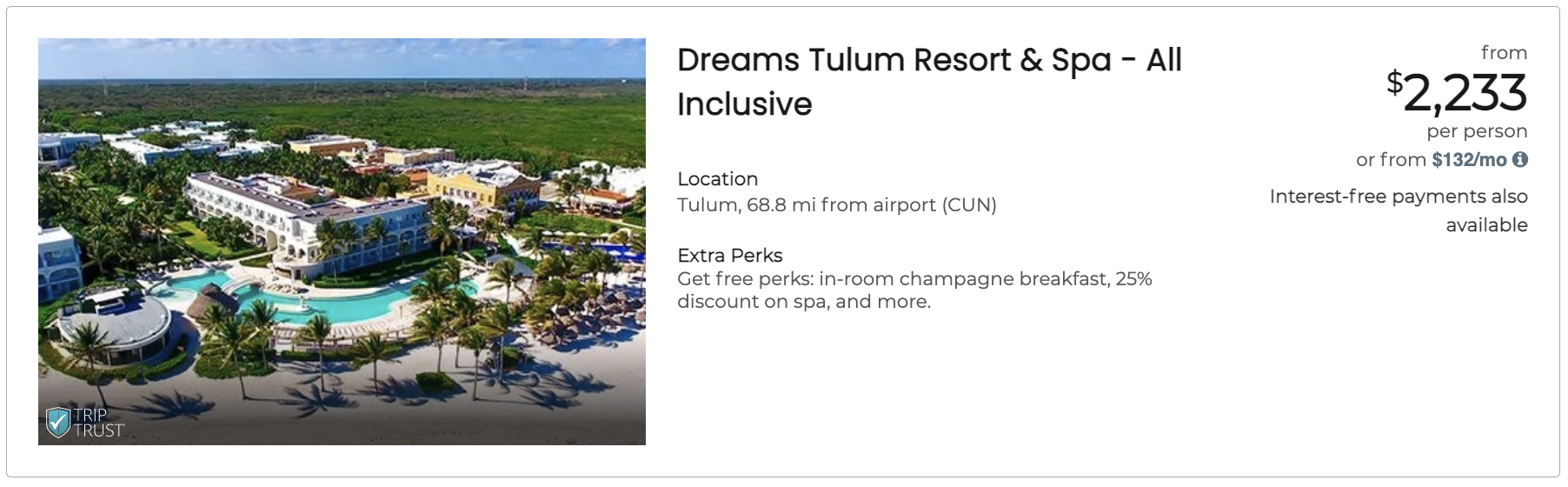
Promotional Financing adds special messaging — such as **0% APR**, **$0 down**, or **deferred payments** — to your `<up-from-pricing>` components. When a promotion is active for a given price point, the component automatically displays a promotional badge alongside the monthly pricing.
## How Promos Work
Promos follow a resolution pipeline:
1. The backend returns available promos for each price point in the API response (e.g., `["zero-percent-guaranteed", "zero-down-guaranteed"]`)
2. The component decides what to display based on your configuration
3. Matching promos render as badges with localized text inside the Shadow DOM
### Resolution Priority
| Priority | Condition | Behavior |
| --- | --- | --- |
| 1st | `promo-disabled="true"` is set | Promo badges are hidden for that component |
| 2nd | `promo-disabled` is not set (default) | All promos available from the backend are displayed |
In all cases, the SDK internally injects a `zero-down` signal when `pay_today === 0`. This is consumed by the modal and tooltip layers.
## Available Promo Codes
### Zero Down
| Code | Display Text |
| --- | --- |
| `zero-down-guaranteed` | Pay **$0 today!** |
| `zero-down-variable` | Pay **as little as $0 today!** |
### Zero Percent (Interest-Free)
| Code | Display Text |
| --- | --- |
| `zero-percent-guaranteed` | **Enjoy interest-free**, monthly payments! |
| `zero-percent-variable` | **Interest-free payments** may be available! |
| `zero-percent-at-least-one` | **Interest-free payments** may be available! |
### Delayed Payments
| Code | Display Text |
| --- | --- |
| `3-month-delayed` | No payments for **up to 3 months**. |
| `6-month-delayed` | No payments for **up to 6 months**. |
| `month-delayed` | No payments for **up to N months**. (dynamic based on offer) |
### Combined (Zero Percent + Delayed)
| Code | Display Text |
| --- | --- |
| `zero-percent-3-month-delayed` | **Interest-free payments** may also be available and no payments for **up to 3 months**. |
| `zero-percent-6-month-delayed` | **Interest-free payments** may also be available and no payments for **up to 6 months**. |
| `zero-percent-month-delayed` | **Interest-free payments** may also be available and no payments for **up to N months**. |
📘 Promo display text is managed by the SDK and localized automatically. You do not control the badge wording.
## Adding Promotional Messaging
### Default: Show All Available Promos
By default, the component displays every promo badge the backend returns for this price point:
```
```
### Optional: Hide Promo Badges
If you need to suppress promo badges for a specific component, set `promo-disabled="true"`:
```
```
## Behind the Scenes: Zero-Down Signal
You do not need to act on this — it is handled entirely by the SDK.
When the backend returns an offer where `pay_today === 0`, the SDK internally injects a `zero-down` code. The modal and tooltip layers use this signal to display "$0 today" context.
## Campaign-Based Promotions
Promotional campaigns are configured on the Flex Pay side by your Account Manager. You send campaign codes in the order schema via `window.Uplift.Payments.load(orderInfo)`, and the backend determines which promos apply to each price point.
See [Campaign Targeting](https://uplift-docs.document360.io/docs/campaign-targeting-v2) for details on sending campaign data.
⚠️ Campaign-based promotional filtering is only supported when `price-type` is **different from `total`**. If `price-type="total"`, campaign filtering does not apply.
## Styling Promo Badges
Customize promotional badge appearance using CSS Custom Properties:
```
up-from-pricing {
--fp-promo-color: #ffffff;
--fp-promo-font-size: 12px;
--fp-promo-font-weight: 400;
--fp-promo-line-height: 1.4;
}
```
See [From Pricing Configurations](https://uplift-docs.document360.io/docs/from-pricing-and-information-modal-configurations-v2#promo-badge-styling) for the full list of styling properties.